Utilisation des données d'un fichier Microsoft Excel pour établir une carte (GUI)
Interaction Utilisateur/Ordinateur à l'aide d'une Interface Graphique Utilisateur (GUI = Graphical User Interface).
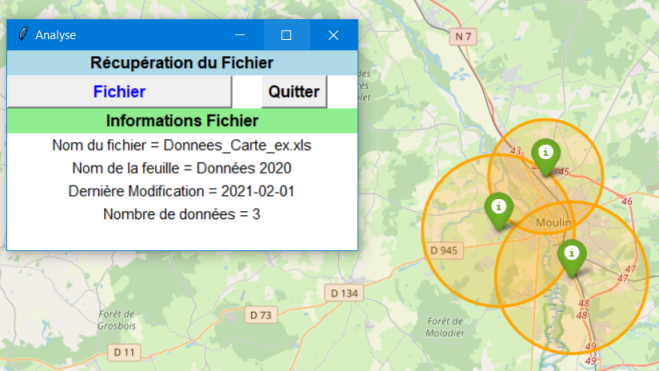
Méthode : Préparation
Utilisation d'édupython 3 et des Modules/Librairies xlrd, folium, webbrowser, os.path2, datetime, tkinter (Rappel installation Bibliothèque/Module).
Télécharger le fichier suivant et le placer dans le même dossier que le fichier Python.
Simulation : Code Python
1
#---------BIBLIOTHEQUES/MODULES---------2
import xlrd
3
import os.path
4
import datetime
5
import folium
6
import webbrowser
7
from tkinter.messagebox import * # boîte de dialogue
8
from tkinter import *
9
from tkinter import filedialog
10
import tkinter as tk
11
12
#----------FONCTIONS----------13
def ChangeF():
14
15
LST_Types = [( 'Fichier Excel' , '.xls' )]
16
leFichier = tk.filedialog.askopenfilename ( title = "Sélectionnez un fichier ..." , filetypes = LST_Types )
17
if leFichier == "" : return
18
if leFichier:
19
document = xlrd.open_workbook(leFichier)
20
feuille = document.sheet_by_index(0)
21
NomF = os.path.basename(leFichier)
22
23
# Affichage informations du fichier24
infos = StringVar()
25
infos.set('Informations Fichier')
26
monAffichage = Label(Mafenetre, textvariable = infos, bg='lightgreen', font=("Arial", 12, 'bold'))
27
monAffichage.grid(row=2, columnspan=2, sticky='ew' )
28
29
leChemin = StringVar()
30
NomF = os.path.basename(leFichier)
31
leChemin.set('Nom du fichier = '+NomF)
32
33
nom = str(feuille.name)
34
laFeuille = StringVar()
35
laFeuille.set('Nom de la feuille = '+nom)
36
37
Modif = StringVar()
38
timestamp = os.path.getmtime(leFichier)
39
dateF = datetime.date.fromtimestamp(timestamp)
40
Modif.set('Dernière Modification = '+str(dateF))
41
42
nlignes = feuille.nrows
43
ndonnees = str(feuille.nrows-1)
44
NbreDonnees = StringVar()
45
NbreDonnees.set('Nombre de données = '+ndonnees)
46
monAffichage = Label(Mafenetre, textvariable = leChemin, bg='white', font=("Arial", 11))
47
monAffichage.grid(row=4, columnspan=2, sticky='ew')
48
monAffichage = Label(Mafenetre, textvariable = laFeuille, bg='white', font=("Arial", 11))
49
monAffichage.grid(row=5, columnspan=2, sticky='ew')
50
monAffichage = Label(Mafenetre, textvariable = Modif, bg='white', font=("Arial", 11))
51
monAffichage.grid(row=6, columnspan=2, sticky='ew')
52
monAffichage = Label(Mafenetre, textvariable = NbreDonnees, bg='white', font=("Arial", 11))
53
monAffichage.grid(row=7, columnspan=2, sticky='ew')
54
55
# Création d'une carte56
centre = [46.548312, 3.287667]
57
# Lecture des données58
carte= folium.Map(location=centre,zoom_start=11)
59
for i in range(1,nlignes):
60
etiquette=feuille.cell_value(i,0)
61
longitude=feuille.cell_value(i,1)
62
latitude=feuille.cell_value(i,2)
63
donnee=feuille.cell_value(i,3)
64
lieu = [longitude, latitude]
65
# Ajout marqueur avec légende, couleur66
folium.Marker(
67
location=lieu,
68
popup=etiquette,
69
icon=folium.Icon(color='green')
70
).add_to(carte)
71
# Périmètre donnée(s)72
perimetre = float(donnee)*1000 # 1000 = transformer données km en m
73
folium.Circle(lieu,radius = perimetre, fill=True, color='orange' ).add_to(carte)
74
# enregistrement et affichage de la carte75
nomcarte = nom+"_"+str(dateF)+'.html'
76
carte.save(nomcarte)
77
webbrowser.open(nomcarte)
78
79
#----------PROGRAMME PRINCIPAL----------80
fichier=''
81
# Création de la fenêtre principale (main window)82
Mafenetre = tk.Tk()
83
Mafenetre.title('Analyse')
84
# Taille de la fenêtre85
Mafenetre.geometry('350x200')
86
Mafenetre.configure(bg='white')
87
Mafenetre.columnconfigure ( 0 , minsize = 200 , weight = 1 )
88
Mafenetre.columnconfigure ( 1 , minsize = 100 , weight = 1 )
89
90
debut = StringVar()
91
debut.set('Récupération du Fichier')
92
monAffichage = Label(Mafenetre, textvariable = debut, bg='lightblue', font=("Arial", 12, 'bold'))
93
monAffichage.grid(row=0, columnspan=2, sticky='ew' )
94
95
# widget bouton Changer de Fichier96
ChangeF = tk.Button(Mafenetre, text ='Fichier', fg='blue', font=("Arial", 12, "bold"), command= ChangeF)
97
ChangeF.grid(row=1, column=0, sticky='ew' )
98
# widget bouton Quitter99
Quitter = tk.Button(Mafenetre, text ='Quitter', font=("Arial", 12, "bold"), command = Mafenetre.destroy)
100
Quitter.grid(row=1, column=1)
101
102
Mafenetre.mainloop()